Who Is My Member? A Surprisingly Complex Question
by Dr. Prince Baawuah, Head of Medicare Advantage Solutions and Yubin Park, PhD, Co-Founder
You think you know who your members are. But Medicare Advantage membership isn't a static fact — it's a continuously moving target.
For MA plans, enrollment status depends on more than your internal records. It depends on CMS confirming every transaction you submit through MARx. It depends on Medicaid eligibility that can change month to month for dual-eligible members. It depends on Social Security records, state Medicaid databases, and systems like T-MSIS — each maintained on different schedules, with different error rates, by agencies that CMS doesn't control. A member who was confirmed last quarter may be in a different status today, and your plan may be the last to know.
The complexity deepened in 2025. CMS replaced the quarterly SEP for dual-eligible members with a monthly SEP — meaning full-benefit dual-eligible members can now disenroll from an MA plan and return to Original Medicare every single month. For enrollment operations teams, that's twelve potential disenrollment windows per member per year instead of four. More transactions, more DTRR replies to process, more opportunities for a rejected or lost transaction to result in a member whose status you think you know but CMS sees differently. Some brokers may view the monthly window as an opportunity to move members — which only adds to the volume plans need to stay on top of.
CMS is actually willing to work with plans to sort these issues out. But the burden is on you to catch them and reach out. If you don't surface a problem proactively, it doesn't get fixed — it just becomes a loss.
The Workarounds That Don't Scale
Most plans have learned to live with this fragility through manual processes: portal checks, spreadsheet trackers, printed TRC lookup guides taped near desks. It works until it doesn't.
Transaction Reply Codes (TRCs) are how CMS communicates what went wrong. There are nearly 300 of them, and each has its own fix. Under a manual workflow, catching a rejection, decoding the TRC, routing it to the right person, and resubmitting before the deadline requires coordination across multiple systems — and that's before accounting for the fact that MARx itself has documented software issues that have caused erroneous disenrollments and incorrect premium deductions. AEP and OEP make it worse — volume spikes and the same fragile process has to absorb double or triple the transactions. But the truth is, eligibility churn doesn't take a break between open enrollment periods. It just gets less attention.
Making matters harder: SSA is operating at its lowest staffing levels in 50 years, which means the upstream data CMS depends on is arriving slower and with more errors than in any recent period. That lag flows directly into enrollment transactions — and directly into your rejection queue.
Introducing the Transaction Monitor
We built the CMS Enrollment Transaction Monitor inside Falcon to give MA plans one shared system for tracking every enrollment submission end to end.
The mental model is simple: think of it as a text message thread with CMS. You send a transaction. CMS replies. The reply is tagged — accepted or rejected, read or unread. If a response is needed, you reply and the thread continues. Every step is visible. Nothing disappears.
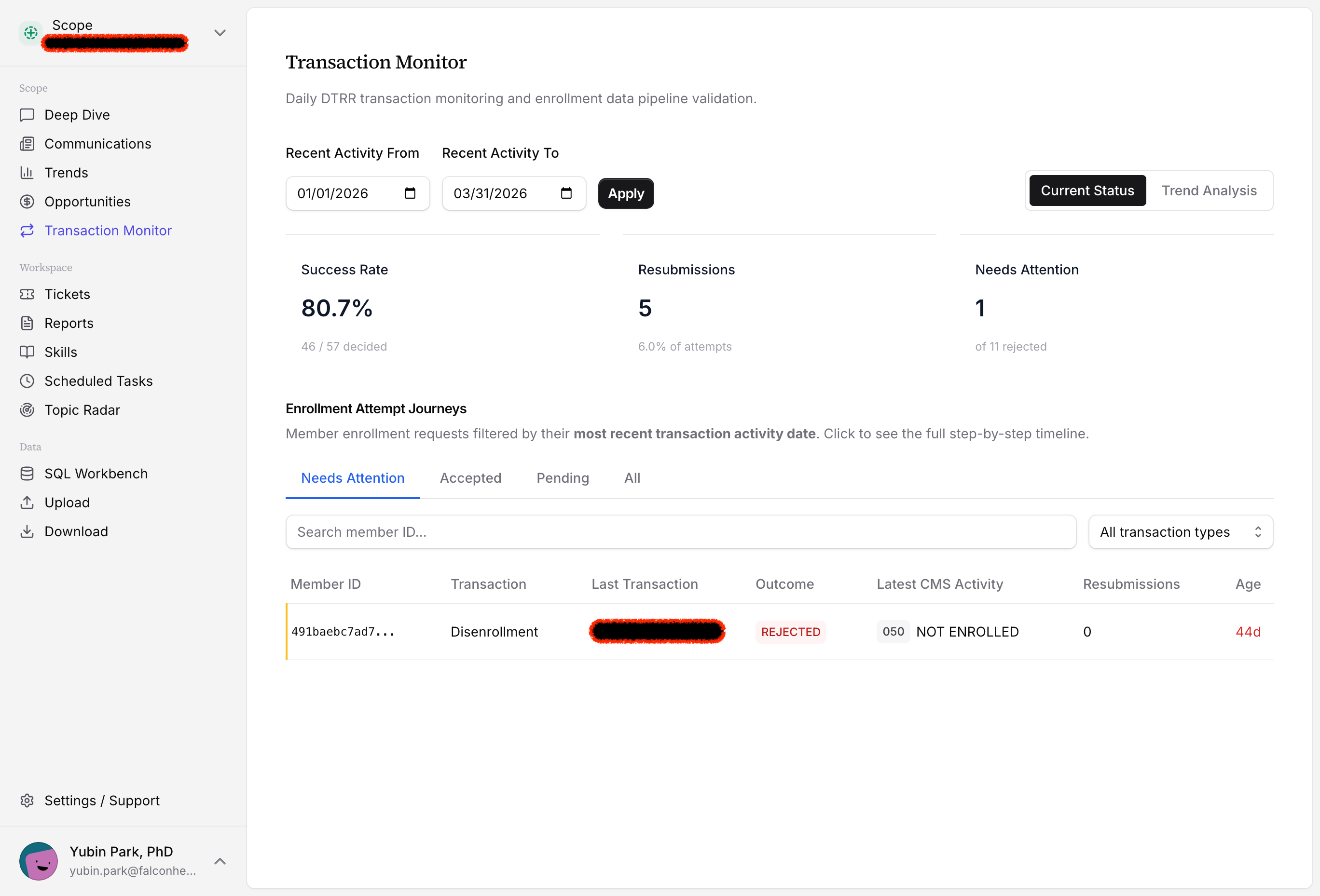
The dashboard surfaces every pending, rejected, and accepted transaction in real time, with top-level metrics: your overall success rate, resubmission count, and the cases that need immediate attention. No portal logins. No spreadsheet reconciliation.
Transaction Journeys: The Full Story for Every Member
Click into any member and you see their complete Transaction Journey — every submission to CMS, every reply, every action taken — laid out as a step-by-step timeline.
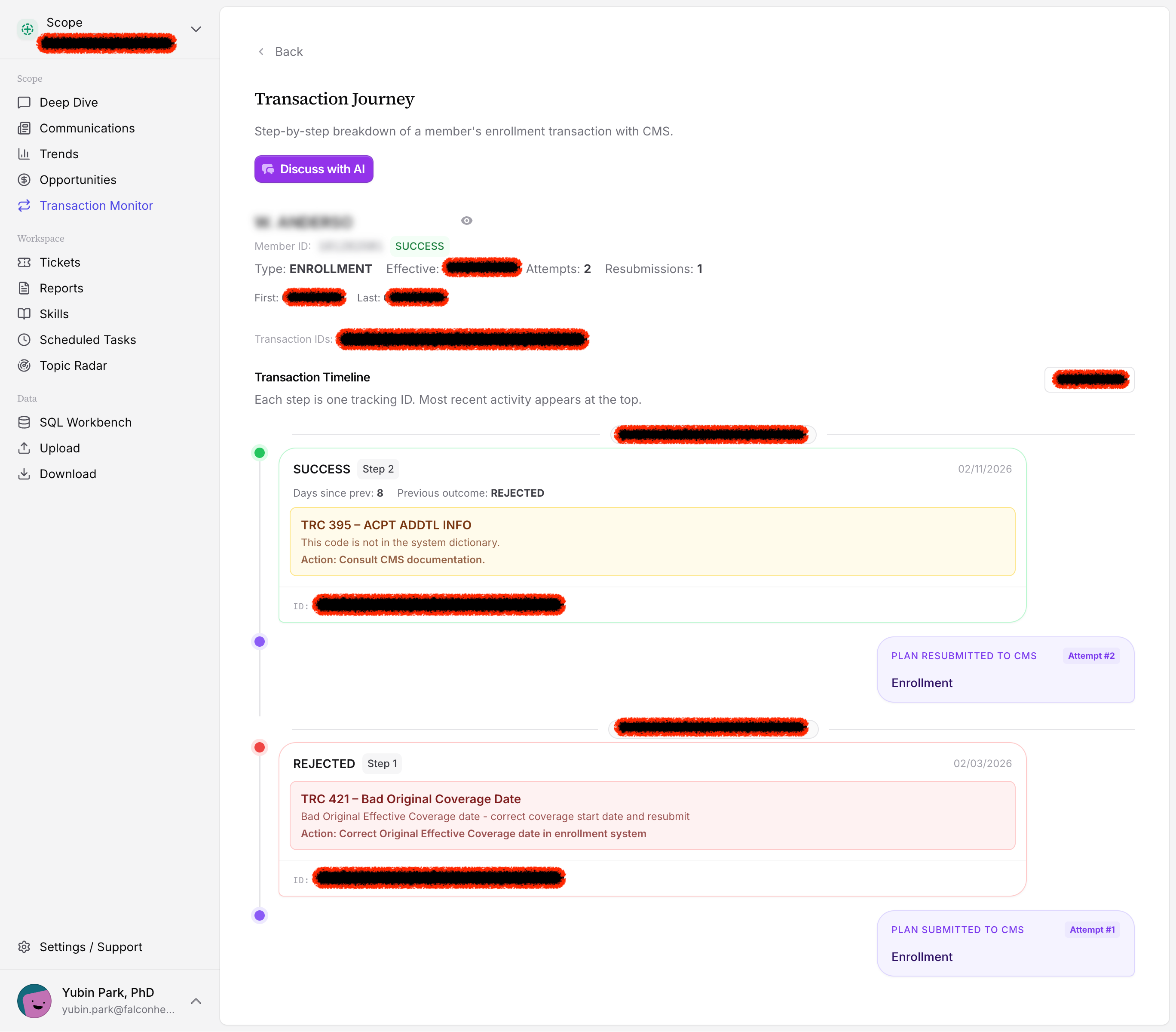
The timeline above shows a typical scenario: a plan submits an enrollment, CMS rejects it (TRC 421 — bad original coverage date), the team corrects and resubmits, and CMS confirms. What used to require multiple portal sessions and manual lookups is now one scrollable view.
TRC Interpretation Built In
When CMS rejects a transaction, the system doesn't just surface the code. It explains what went wrong — and what to do next. For TRC 421, that means: bad original coverage date, here's how to correct it, here's what a successful resubmission looks like.
But interpretation is just the start. Every Transaction Journey has a Discuss with AI button, powered by Scope — our MAPD data reconciliation and analyst agent. Click it, and you're in a conversation that already has full context: the member's history, the rejection reason, and every prior action taken.
Ask Scope why the transaction was rejected. Ask it to find similar cases across your membership and show you how those were resolved. Ask what additional data is needed to resolve the issue — and Scope will go find it. It cross-references other CMS reports to surface discrepancies that explain the rejection. It looks up your internal census file to check whether the member data on record matches what was submitted. When EHR data is available, it pulls that too — confirming eligibility details against the clinical record before you resubmit.
It doesn't give you a generic help article. It works through the specific situation in front of you, pulling from every data source available to build a complete picture and a clear resolution path.
This is the part that changes the job. Your ops team doesn't need to be enrollment experts. They need to know what to ask — and Scope handles the rest.
Top tip
Enrollment issues often aren't one-off mistakes — they reveal upstream problems in how data is being entered or submitted. Scope can surface patterns across rejections and help your team identify systemic fixes before the same error compounds across hundreds of members.
Automatic Audit Trail
Every submission, CMS reply, and team action is logged automatically. The Transaction Monitor generates a complete audit trail as a byproduct of normal operations — no manual documentation required.
This matters more than it used to. In February 2026, OIG released new compliance program guidance for Medicare Advantage — the first major update since 1999. Plans are now expected to demonstrate proactive data validation and continuous reconciliation against CMS records. A clean, timestamped audit trail isn't just operationally useful; it's becoming a compliance expectation. If you've read our post on how OIG surfaces audit exposure from coding patterns, the same principle applies here: the plans that survive scrutiny are the ones that documented their process, not just their outcomes.
Why This Matters
Missed resubmissions are silent revenue losses. They don't trigger alerts. They don't show up on a P&L. They simply disappear. In a year when MA plans are already under historic financial pressure, enrollment leakage is the last thing any plan can afford to leave unmonitored.
The problem isn't just seasonal. Medicaid eligibility changes continuously — a dual-eligible member can lose Medicaid coverage in the middle of a plan year, affecting their benefit structure and your revenue. CMS databases have lags. State systems have lags. By the time a discrepancy surfaces, the resubmission window may already be closed.
CMS will work with plans that flag these issues early. But they won't chase you. Plans that proactively surface and resolve enrollment discrepancies protect their membership. Plans that don't are left holding the loss.
The Transaction Monitor makes it possible to be proactive. Rejections surface the day they happen. Your team resolves them before windows close. And the audit trail means you can demonstrate exactly what steps you took and when.
Your Members Are Only Yours Once CMS Says So
Until CMS confirms an enrollment, that member isn't officially in your plan — regardless of what your internal systems show. The Transaction Monitor makes the entire confirmation loop visible, trackable, and manageable for everyone on your team.
The CMS Enrollment Transaction Monitor is available today in Falcon. Get in touch to see it in action.